Frequently asked questions

1. The Dustfolio software
Who can register?
The application is open to everyone, but we prefer creatives in the following categories:
- graphic artist
- Illustrator
- Youth Illustrator
- Object Designer
- Web Designer
- Photographer
- Architect
- Stylist
- Varied
- Artistic director
- Set Designer
The use of the application to present personal or family photos is prohibited.
Is the use of the Dustfolio software for a fee ?
The basic formula is free.
But you can if you like the service pass on the formula "Pro" which is paying.
You will find all the information on the page "Dustfolio formulas".
Can I use the free Dustfolio software for commercial use ?
Yes, but you can not resell this service to a third party.
Can I create multiple free portfolios ?
Yes, within the limit of 3 portfolios.
2. The Dustfolio formula
What is the Dustfolio formula ?
It allows you to have better visibility at the site level.
But also to obtain additional services that do not exist in the free formula (help by email, several portfolios, space and more images ...).
You can find all the information on the '' Dustfolio formulas '' page.
What happens after my "Dustfolio" formula ?
You can of course renew it for a year or for six months.
If you do not want to renew it, in this case you can always move, modify or delete your images, but not add new ones (beyond 24 images).
Your book will only show the first 24 images of the first 2 portfolios.
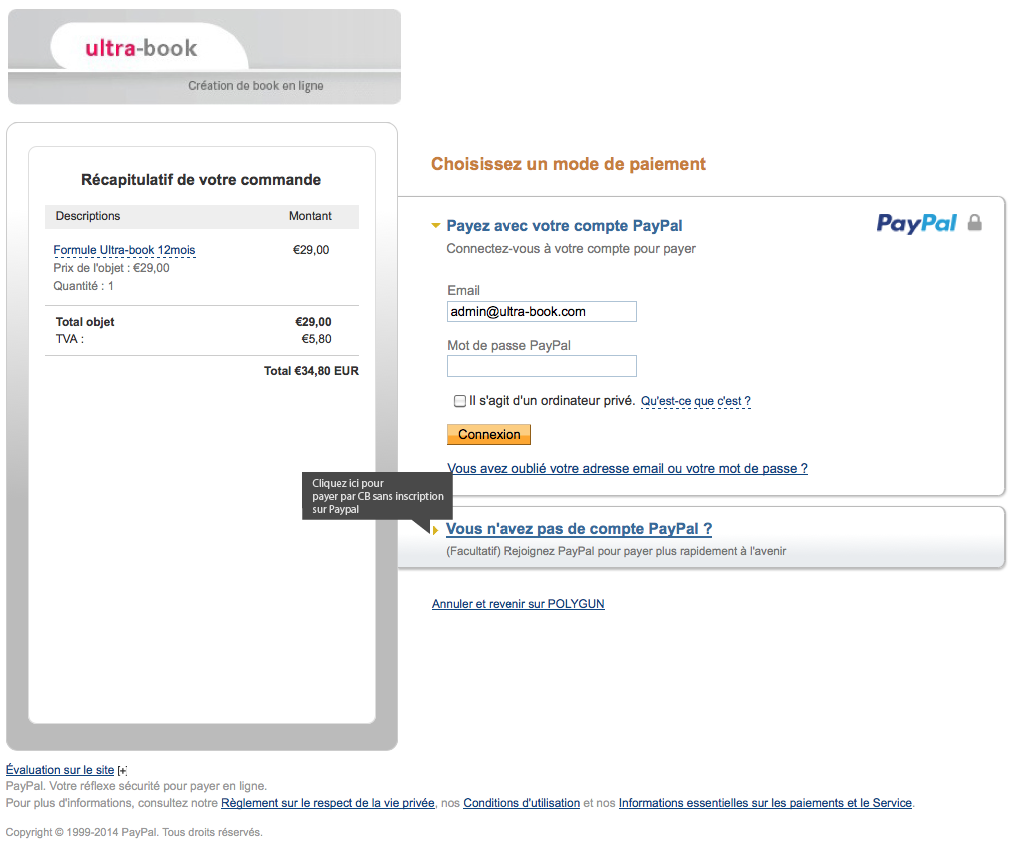
I would like to renew my formula but I can not pay by credit card, is it necessary to have a paypal account ?
You do not have to register on paypal.
You can pay directly by credit card by clicking on the link "Do not have a Paypal account?"
3. Portfolios templates
Where can I change my book template ?
You can change your book template at any time from the menu "Personalize my book"
If I change my model, are my current settings lost ?
No, you will find them by returning to the previous model.
See also the topics and examples: Questions answers about the models
4. The image formats of the Dustfolio software
You can load all Jpeg, gif and Png images into your portfolio.
These must be
in RGB (no CMYK!)
at 72 DPI
the weight must not exceed 1MB
maximum size 1180 x 3600 pixels (New format since 2014)
The names of the image files must end with their extension (ex: my_image.jpg or monimg.gif), the names must not include white space, accentuation or special characters (eg of file name to avoid: mô-! § & @ éà n * image will not pass.gifee), also avoid uppercase in the name of the files.
Is it possible to add flash sequences ?
Yes, but only on the book model: "classic", and 2012. Your sequences must be in .swf and weigh less than 1MB.
How to quickly navigate from one image to another in the portfolio ?
Use the cursor left / right keys.
5. The address of my portfolio
You can access your portfolio from the address in the form http://nomprenom.Dustfolio.com <http://nomprenom.Dustfolio.com/>
(do not put www in front)
How to redirect my domain name to my book ?
To do this, you have to do a web redirection of your domain name to your book.
Example: www.monprenomnom.com <http://www.monprenomnom.com/> => mybook.Dustfolio.com <http://monbook.Dustfolio.com/>
This is done at the level of the administration of the domain name.
(if your domain name is at OVH you have to make an invisible redirection)
6. Known issues
I just modified the pictures of the menu of my book, but the old pictures are still present ?
Just clear the cache to see the right images of the menu ...
If you are on Firefox, reload the page by pressing the Shift + Apple + R keys at the same time or go to the preferences menu.
Some images are not displayed on my portfolio !
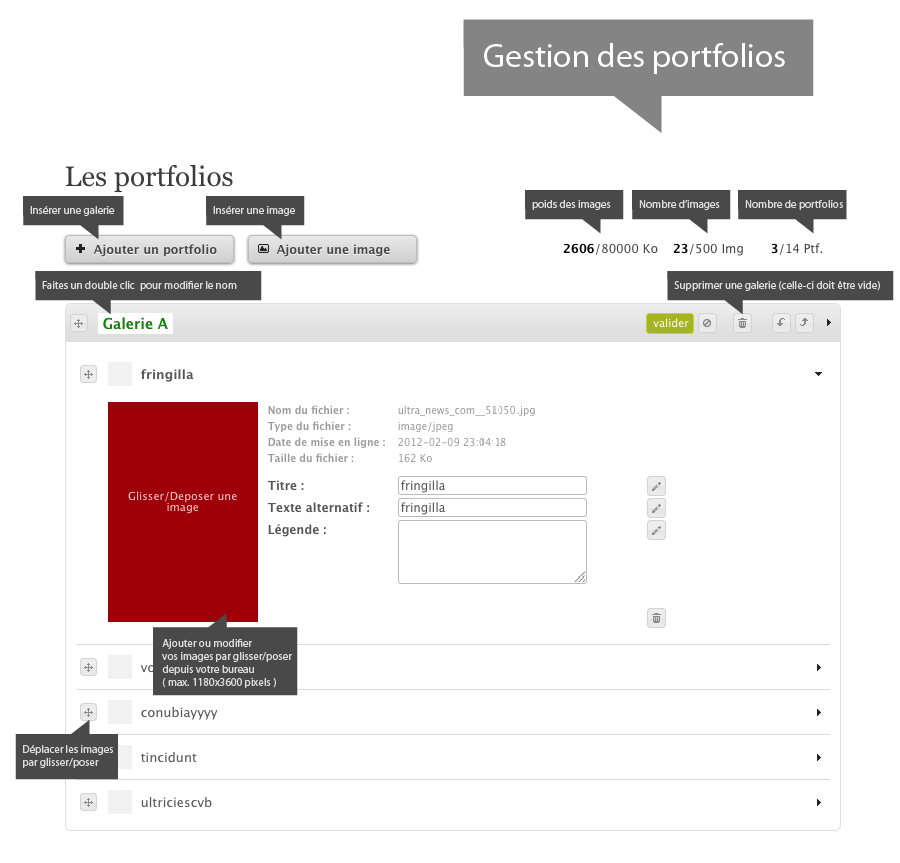
Try already in the administration of your book, move the last image of a position above (by a simple drag and drop).
Also check that you have not exceeded the quota of 24 images per portfolio, if you are free.
How is this number of images calculated ?
I have less than 24 images on my portfolio and I have already reached the quota!
This total number of images is the sum of the images of the portfolio and the images loaded from the page editor (home / news).
Remember to delete images in the page editor (the news section) to be able to add others in the portfolio.
How to access the images of the page editor (home / news) ?
Once in edit mode on an actual page, the button to access the image library of the page editor is the 6th button of the 1st row (small house)
Then do "explore the server". Once on the images, right click then "delete".
(see also the diagram below)
7. User's Guide
Is there a user guide for Dustfolio ?
Yes, for the 2012 version you can download it in PDF here.
The 2014 version is under preparation.
8. Page editor (home and news)
How does the News or Home page editor work ?
below the main features
It is from the button "Insert an image" that you will be able to access your library of images and if necessary, to remove it.
How to add videos (vimeo, youtube ...) on my news or home page ?
Just switch to Source mode (1st button at the top left) in the Page Editor
And copy and paste the HTML code. (see diagram below)
Once your layout is finished, remember to click again on the full page mode (2nd button) and to validate the page (green button "validate")

9. Referencing my book in google
How to reference my book in google ?
This is normally done automatically, but you can manually add the address of your book, it's here.
How long will my book be referenced in google ?
The inclusion of referencing a book in google is usually a week.
How long is my book referenced in google ?
As long as it exists online, if the book is deleted, it will take a few days for google to update its referencing and remove the link to your book.
I just deleted my book, does it still appear in the results of google ?
You have to wait for google to update and remove the link to your old book; usually a week.